MTD for construction: CIS subcontractors and contractors under Making Tax Digital for Income Tax
Last updated: 2 November 2026
If you're a self-employed builder, electrician, plasterer or other tradesperson working under the Construction Industry Scheme (CIS), Making Tax Digital (MTD) for Income Tax applies to you in the same way as any other sole trader. What's different is your paperwork: the contractor keeps back part of your pay, and the money reaching your bank isn't the figure HMRC treats as your income.
This guide covers how CIS works, how a subcontractor records CIS pay in MTD software, the mistakes that make quarterly figures wrong, what contractors record, and what to check at the end of the year. For MTD in general, start with MTD for sole traders.
Key facts for CIS and MTD
| Who it applies to | Self-employed subcontractors and contractors with qualifying income over the threshold |
|---|---|
| Qualifying income | Your turnover before expenses, so CIS pay before deductions |
| CIS deduction rates | 20% if registered, 30% if not, nothing with gross payment status |
| What a deduction is | An advance payment towards your Income Tax and National Insurance |
| Your income figure | The gross amount on your payment and deduction statement, not the bank deposit |
| CIS tax months | Run from the 6th of one month to the 5th of the next |
| Next MTD deadline | 7 November 2026 (a Saturday, so aim to send by Friday 6 November) |
| At year end | HMRC adds the CIS deductions it holds to your tax return, and you must check them |
How CIS works
Under CIS, a contractor paying you for construction work must take a deduction from your pay and pass it to HMRC. HMRC's subcontractor guide gives the rates:
- 20% if you're registered for CIS
- 30% if you're not registered
- nothing, if you have gross payment status
HMRC says these deductions "count as advance payments towards your tax and National Insurance bill". They're tax already paid on your behalf, not a cost of your business.
The contractor doesn't take a deduction from the whole invoice. HMRC lists the parts left out: VAT, consumable stores, plant hired for the job, manufacturing or prefabricating materials, and materials you paid for directly. That's why the deduction on your statement is often less than 20% of the invoice total.
Payment and deduction statements
Each month you're paid, the contractor must give you a statement showing what they paid you and what they deducted. HMRC says it's due within 14 days of the end of each tax month. If one doesn't arrive, ask the contractor for it. If the figures look wrong, raise it with them.
These statements are the records you need for MTD. Keep them all, because HMRC may ask for evidence of your deductions.
Does MTD for Income Tax apply to me?
It applies if you're a sole trader registered for Self Assessment and your qualifying income is over the threshold: over £50,000 from 6 April 2026, over £30,000 from April 2027 and over £20,000 from April 2028, based on your tax return for the earlier year.
Qualifying income is your income "before expenses (also known as turnover)". For a subcontractor, that means your CIS pay before deductions, plus income from any other self-employment or property. A plasterer whose bank receives £42,000 a year after 20% deductions could have gross pay well over £50,000.
If you work through your own limited company, MTD for Income Tax doesn't cover the company's income, and the company claims back CIS deductions through payroll instead. If you're in a partnership, HMRC says partnerships don't need to use MTD for Income Tax yet. To check your own position, use the MTD eligibility checker, and see what counts as qualifying income.
How a subcontractor records CIS pay
GOV.UK's MTD pages don't spell out how to record CIS pay during the year. The Self Assessment rule is clear, though. HMRC says that at year end you list your "total pay before deductions" as income and your total deductions as CIS deductions. Your contractors already report the deductions to HMRC, so during the year your records only need the income side. For each payment and deduction statement:
- Record the gross amount as income. This is the total paid before the CIS deduction, recorded as turnover (business income from customers).
- Don't record the CIS deduction. It isn't income or an expense, and it isn't part of a quarterly update. HMRC gets it from your contractor's monthly return. Keep the statement for the year-end check.
- Record any materials as expenses. If you bought materials for the job, record what you spent as a business expense, from your receipts, the same as any other cost.
A worked example
A contractor's statement for the tax month 6 September to 5 October shows:
| Payment made in tax period | Month 6 (Sep) |
|---|---|
| Gross amount paid (excluding VAT) | £3,000 |
| Cost of materials | £500 |
| Amount liable to deduction | £2,500 |
| Amount deducted (20%) | £500 |
| Amount paid to you | £2,500 |
You record £3,000 of income, dated in that tax month (by 5 October), so it falls in the quarter to 5 October. The £500 deduction isn't recorded: the contractor reports it to HMRC, and you check it at year end. If you paid £500 for the materials yourself, your receipts for them go in as an expense. Your bank only shows £2,500 arriving, but your income is £3,000.
The bank deposit trap
Most MTD software, including AATAX, can read your bank statements or pull in transactions from a bank feed. For CIS work that causes a problem, because the deposit from the contractor is the net amount, after the deduction:
- If you record the bank deposit as well as the statement, that income is counted twice.
- If you record only the bank deposit, your income is too low.
So for each CIS payment, make sure the gross amount counts once. There are two simple ways to do it:
- Change the bank deposit to the gross amount. Your one record for the payment then shows what you really earned.
- Record the statement's figures separately, and mark the bank deposit as a duplicate of them rather than deleting it.
Either way, check it for every contractor and every month.
Payments with no deduction
Not all your income comes under CIS. Private customers (a homeowner paying you to fit a kitchen, say) don't take deductions, and if you have gross payment status, neither do contractors. Those payments are just turnover, and the bank deposit is the full amount. Record them as payment from a customer and keep your invoices.
When the statements don't line up with your quarters
CIS tax months run from the 6th of one month to the 5th of the next. The standard MTD quarters (6 April to 5 July, 6 July to 5 October, and so on) start and end on the same dates, so a month's statement falls in one quarter. If you chose calendar quarters instead (1 April to 30 June, and so on), a statement can straddle two quarters.
Watch the date. A statement is usually printed a few days after its tax month ends, so the date at the bottom isn't when you were paid. Date the income in the tax month the statement covers ("payment made in tax period Month 6 (Sep)" means 6 September to 5 October). If you use the printed date, a payment made before 5 October can end up in the next quarter and be left out of your update.
What you send each quarter
Every 3 months, your software sends HMRC the totals for each category, covering the tax year so far. HMRC's quarterly updates guidance calls these "summaries, not tax returns". For a subcontractor, that's your gross turnover and your expenses. CIS deductions aren't part of it: the self-employment update does have a "tax taken off trading income" figure, but HMRC defines it as other tax taken off apart from CIS deductions, so for CIS work it stays at zero.
Updates are cumulative. If a statement arrives late, or you find you recorded a deposit twice, correct the records and the fix goes into your next update. You don't need to resend the old one, though you can if you want HMRC's figures corrected sooner. You must still send an update for a quarter with no work.
The 2026-27 deadlines are 7 August, 7 November, 7 February and 7 May. 7 November 2026 falls on a Saturday, so aim to send your update by Friday 6 November. See MTD deadlines 2026-27. HMRC won't give penalty points for late quarterly updates in 2026-27, but you still have to send them all.
At the end of the tax year
When you submit your tax return through MTD software, HMRC adds information it already holds, including "Construction Industry Scheme (CIS) subcontractor deductions" from your contractors' monthly returns. HMRC says: "You must check this information before you submit your tax return."
To check it, compare HMRC's figures, contractor by contractor and month by month, with your payment and deduction statements:
- A deduction is missing. A contractor may not have filed their return, or filed it under the wrong details. Add it from your statement in your software, and keep the statement as evidence.
- A figure is different. Ask the contractor to check what they sent HMRC.
- A statement is missing. Ask the contractor for a copy. If you can't get one (the contractor stopped trading, say), HMRC explains what to send it in writing.
HMRC then takes your deductions off your tax bill. If you've had more deducted than you owe, which is common when you have materials, tools, van costs and other expenses, HMRC refunds the difference through your tax return. If you stop trading during the year, you may be able to claim back deductions early using form CIS40.
If you're a contractor
You're a contractor if you pay subcontractors for construction work. A business that doesn't do construction work is a "deemed" contractor once it has spent more than £3 million on construction in the 12 months since its first payment. Plenty of contractors are sole traders who are subcontractors themselves on other jobs, and they keep both sets of records.
CIS has its own monthly obligations, separate from MTD for Income Tax. HMRC's contractor guide covers them:
- Verify each new subcontractor with HMRC before you pay them.
- Work out the deduction. Start from the gross invoice and take off VAT, materials the subcontractor bought, hired plant and the other items HMRC lists, then apply 20%, 30% or 0%.
- Give a payment and deduction statement within 14 days of the end of each tax month.
- Send a monthly return by the 19th, and pay HMRC by the 22nd (the 19th if you pay by post). If you paid no subcontractors, send a nil return or tell HMRC you're inactive.
- Keep CIS records for at least 3 years after the end of the tax year they relate to.
A late monthly return costs £100, rising to £200 at two months and more after that. These are CIS penalties and have nothing to do with the MTD soft landing.
What a contractor records for MTD
In your MTD records, money you pay subcontractors is a business expense. Use the construction industry payments category, which is a Self Assessment category of its own, rather than wages or materials. Record the full cost of the work: what you paid the subcontractor plus the deduction you passed to HMRC for them, because both are part of what the job cost you. Your CIS monthly returns and payment and deduction statements back up the figures.
Your CIS deductions are paid over to HMRC through the CIS monthly returns, not your MTD quarterly updates.
Other things construction workers often ask
- Tools and protective clothing. Tools, work boots and other protective clothing you buy for work are business costs.
- Vans and travel. Travel between sites is a business cost. Travel from home to a single permanent workplace usually isn't. Record van costs, or use simplified expenses (mileage) if you'll claim that way.
- VAT. If you're VAT registered, the domestic reverse charge for construction services may apply to your invoices. That's VAT, which MTD for Income Tax doesn't change. CIS deductions are never taken from the VAT on an invoice.
- A job as well. If you're also on PAYE as an employee, those wages don't count towards qualifying income, but they still go on your tax return.
Using AATAX for CIS work
AATAX is on HMRC's list of recognised software for MTD for Income Tax. Its HMRC listing (reference D6Q7XM) shows sole trader quarterly updates as ready now, along with the Construction Industry Scheme.
The individual app is free for sole traders, and you don't need a card to sign up. For CIS work:
- Upload your bank statements, receipts and CIS payment and deduction statements. AATAX reads them and suggests a category for each record, which you check before anything counts.
- Each record has a category, including Payment from a customer, Materials and stock for jobs and, for contractors, Paying subcontractors. A CIS statement is read as one record: the gross amount, as payment from a customer.
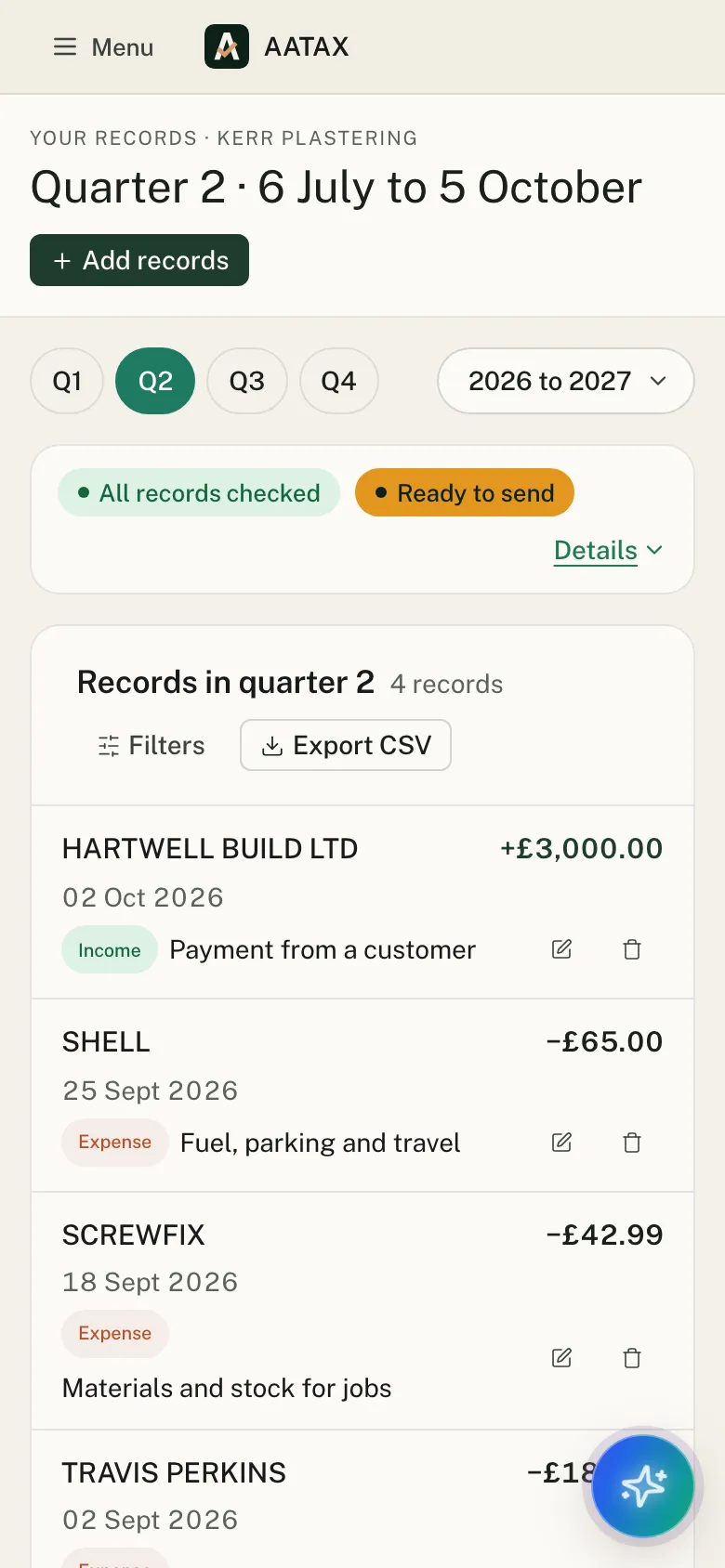
- A bank deposit that matches a statement can be changed to the gross amount, or set to Same as another record, so it's kept but not counted twice.
- A CIS statement is dated in the tax month it covers, not the day it was printed, so it lands in the right quarter.
- At year end, Year end → Other income → CIS deductions shows what HMRC holds for each contractor, and lets you add a deduction HMRC hasn't got, month by month, from your statement.
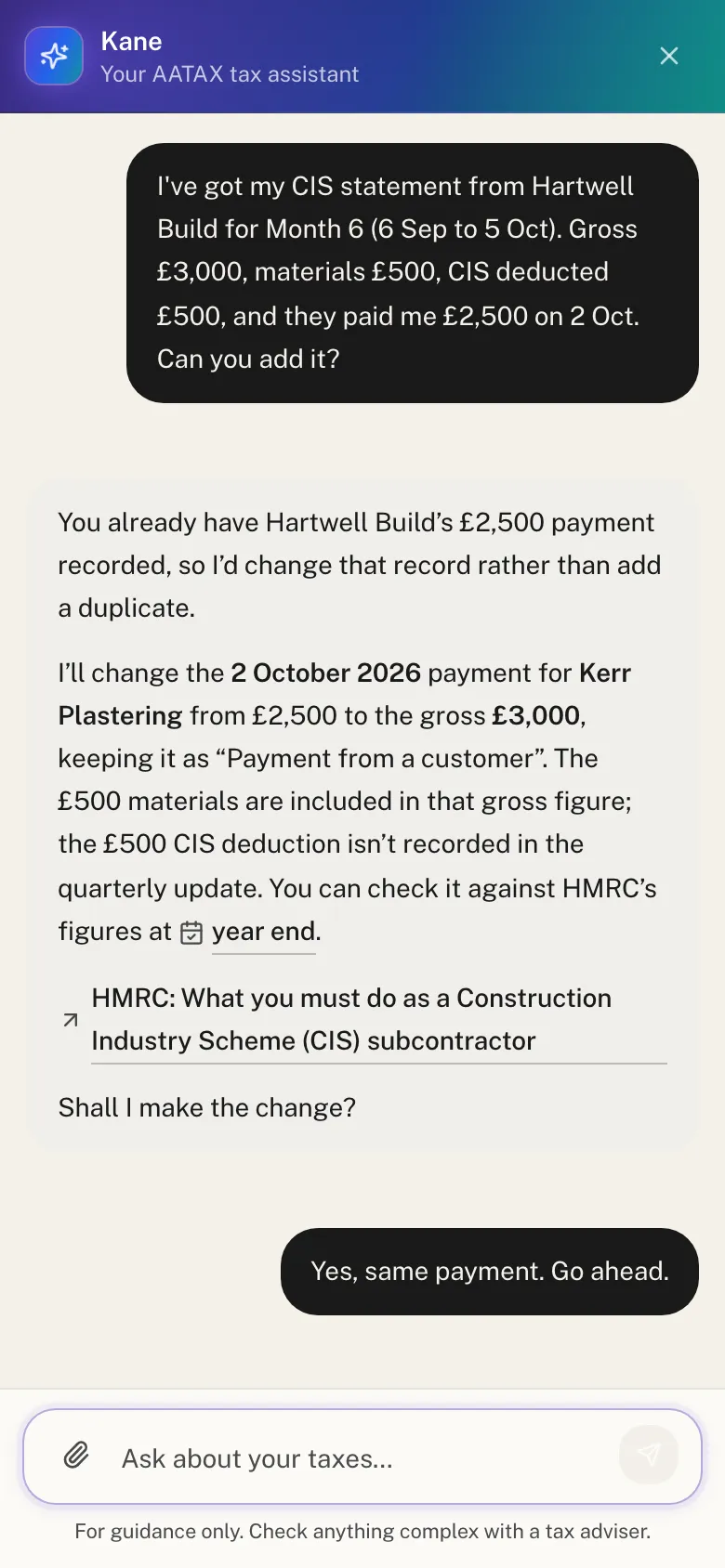
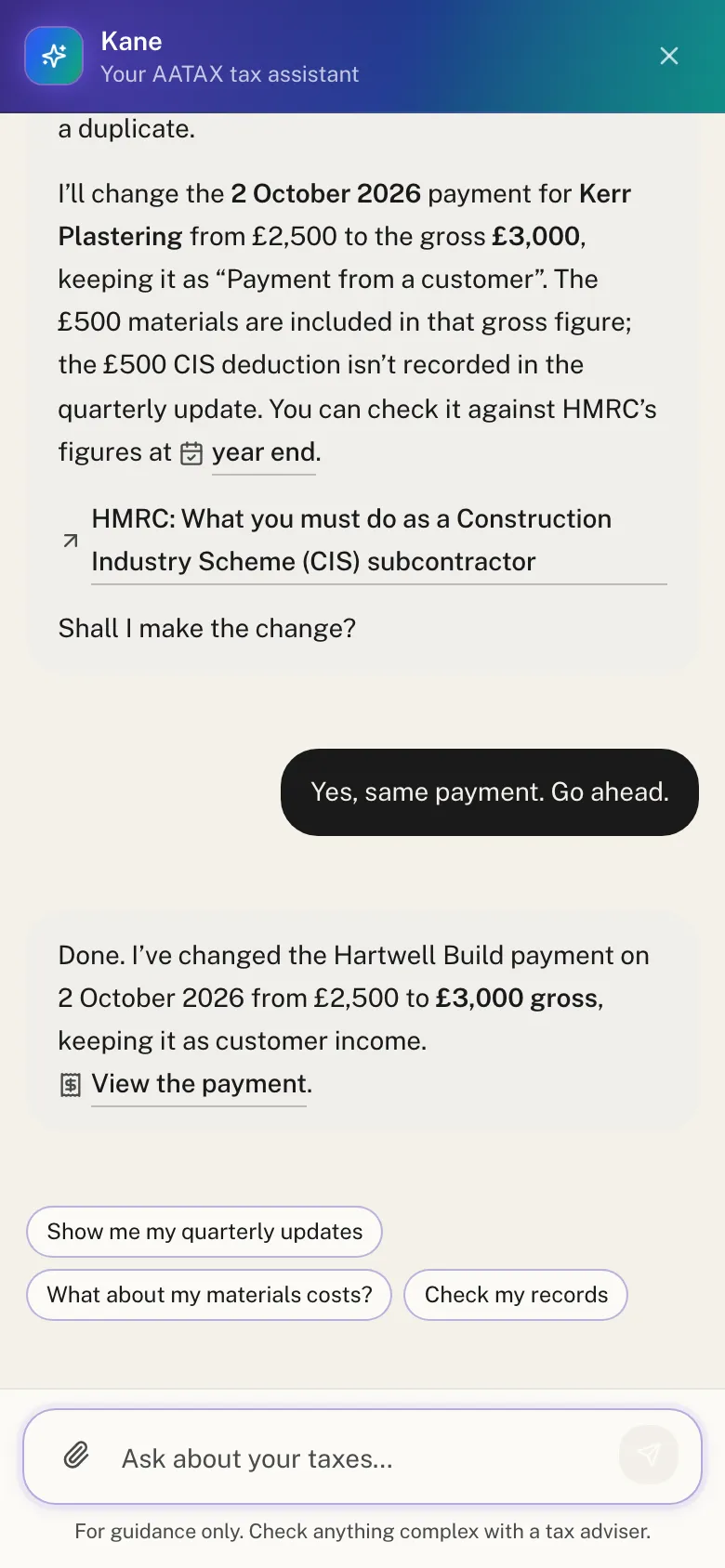
- Kane, the AI assistant, can do this for you. Tell it what's on your statement, and it finds the matching bank deposit, says what it will change to record the gross amount, and makes the change once you say yes. See Kane, the AI tax assistant.
Here a plasterer types in the figures from a CIS statement. Kane spots that the £2,500 deposit from the contractor is already in their records and changes it to the £3,000 gross amount. The £500 deduction isn't recorded:
The screenshots are from a walk-through on HMRC's test service, with a made-up plasterer.
If an accountant looks after your tax, they can run MTD for Income Tax for you with AATAX for accountants.
Frequently asked questions
Does MTD for Income Tax apply to CIS subcontractors?
Yes, in the same way as other sole traders. If your qualifying income is over the threshold (over £50,000 from 6 April 2026) and you're not exempt, you need to keep digital records and send quarterly updates through compatible software.
Is my qualifying income the money I receive or my pay before CIS deductions?
Your pay before deductions. Qualifying income is turnover before expenses, and your CIS pay is turnover in full. The deduction is tax paid in advance, so it doesn't reduce your income.
Should I record the bank deposit from my contractor as income?
Not as it is. The deposit is the net amount after the deduction, so on its own it understates your income, and alongside the statement it counts that income twice. Either change the deposit to the gross amount, or record the statement's gross amount and mark the deposit as a duplicate.
Where do CIS deductions go in MTD?
Not in your records or your quarterly updates. Your contractors report them to HMRC, and at year end HMRC adds the deductions it holds from your contractors' returns to your tax return. You must check them against your statements and add any that are missing.
Will HMRC see the 20% that was taken off my pay?
Yes. Your contractor reports each deduction to HMRC in their monthly CIS return, and HMRC adds those deductions to your tax return at year end. Your job is to check them against your statements before you submit, and fix anything missing.
I'm a contractor. Do I send my CIS returns through MTD?
No. CIS monthly returns are a separate obligation, due by the 19th of each month. In your MTD records, payments to subcontractors are a business expense under the construction industry payments category.
Will I get a CIS refund through MTD?
If your deductions are more than the tax and National Insurance you owe for the year, HMRC refunds the difference after you submit your tax return through your MTD software.
Get started
AATAX's individual app is free for sole traders. Upload your bank statements and CIS statements, check the figures and send your quarterly updates and tax return yourself. No card needed to sign up. Get started free
Sources (GOV.UK, checked 1 November 2026)
- What you must do as a Construction Industry Scheme (CIS) subcontractor
- CIS subcontractors: get paid
- CIS subcontractors: pay tax and claim back deductions
- What you must do as a Construction Industry Scheme (CIS) contractor
- Work out your qualifying income for Making Tax Digital for Income Tax
- Use Making Tax Digital for Income Tax: Send quarterly updates
- Use Making Tax Digital for Income Tax: Submit your tax return
- Penalties for Making Tax Digital for Income Tax
- Find software that works with Making Tax Digital for Income Tax (HMRC software finder, including AATAX's listing)
This page is general guidance, not tax advice. If you're unsure how the rules apply to you, speak to an accountant or contact HMRC.